How to Check AI-Translated Arabic When You Don’t Read Arabic

Your team ran English copy through ChatGPT, DeepL or a built-in AI feature, and nobody in the room can read the Arabic. Before it goes live, you need a way to check AI-translated Arabic and verify that it says what the English says. Here are checks you can run without reading Arabic, and what needs a native linguist.
1. Why back-translation won’t tell you enough
Back-translation, often with another AI tool, catches gross errors but misses whole classes of Arabic error:
- English erases the distinctions Arabic makes. “Are you ready to start?” can be masculine هل أنت مستعد للبدء؟, feminine هل أنتِ مستعدة للبدء؟ or plural هل أنتم مستعدون للبدء؟. All three back-translate identically.
- Back-translation repairs mistakes. An error such as السياسة الجديد ساري المفعول (incorrect), where the adjective and the predicate don’t agree with the feminine noun “policy” (correct: السياسة الجديدة سارية المفعول), will often come back as “The new policy is in force.”
- Literal translations survive the round trip. Render “hit the ground running” word for word as اضرب الأرض راكضًا (incorrect) and it can translate straight back into the idiom. A natural rendering is closer to ابدأ بقوة من اليوم الأول (“start strong from day one”).
Asking an AI tool “Is this Arabic correct?” has the same limit: it can flag obvious problems, but its verdict isn’t evidence. Treat both tests as signals, never as approval.
2. Check how the Arabic renders
Arabic is a cursive script: most letters join their neighbors and change shape by position in the word, as the W3C Arabic and Persian layout requirements describe. Text that has lost its shaping looks like a row of separate letters, often in reversed order. تسجيل (“Sign up”) should look like one connected word. If it shows five separate letters, the software behind that image, PDF or caption doesn’t support Arabic. A few letters, such as ا and و, never join the letter after them, so small gaps inside other words are normal. The fault is every letter standing alone.
Also look for empty boxes (□), question marks or diamond symbols where letters should be, dots cut off at the top or bottom of a line, and single words in a visibly different typeface. Each means the font or the text box wasn’t set up for Arabic. For PDFs and print files, our Arabic DTP layout checklist covers the layout side.
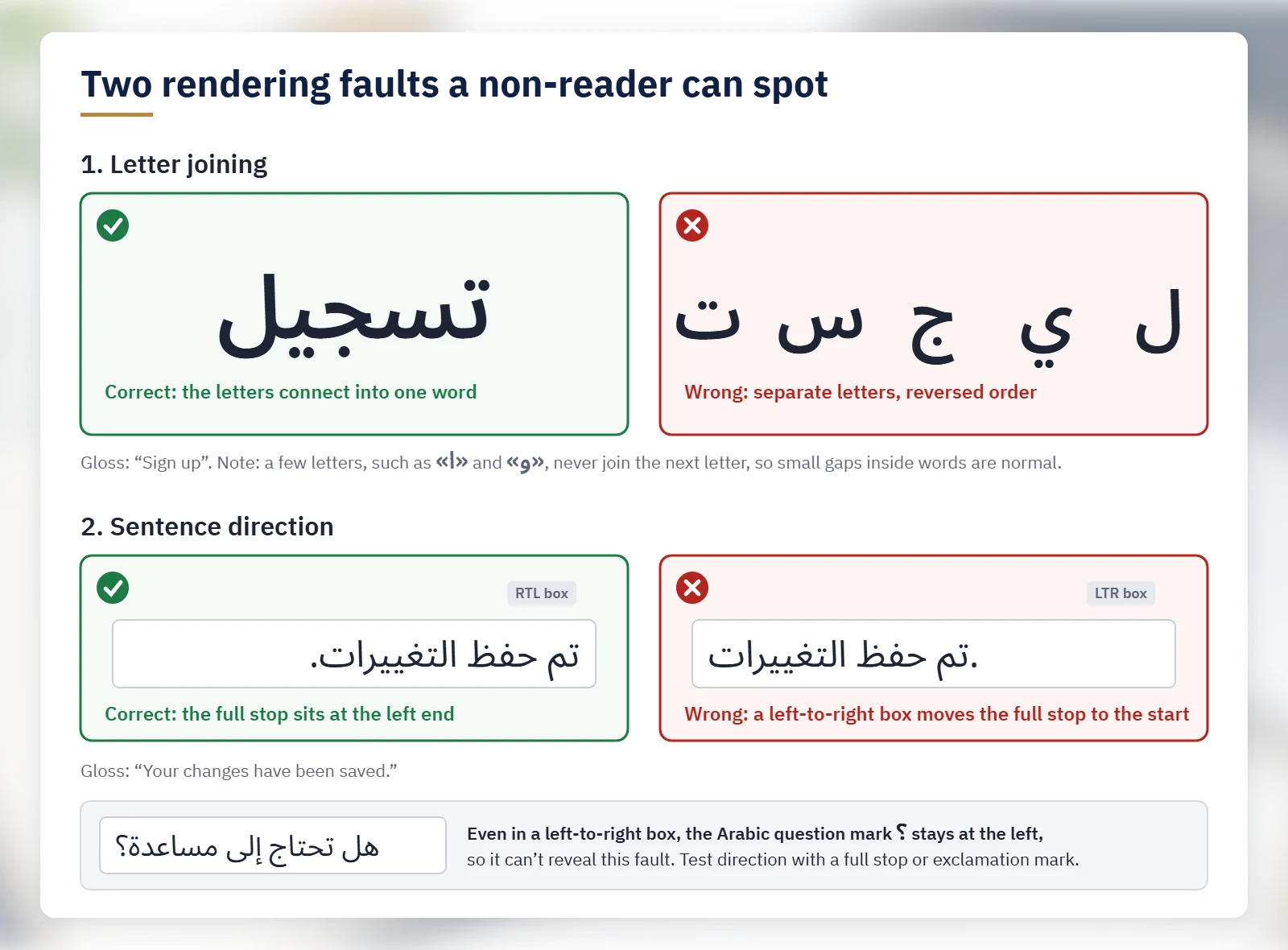
Then check direction. Arabic text should run from the right, with each sentence ending on the left. Arabic has its own comma ، (it looks upside down), semicolon ؛ and question mark ؟ (it faces the other way from ?). The full stop and exclamation mark are shared with English, and those are the ones to test with. In تم حفظ التغييرات. (“Your changes have been saved.”), the full stop should sit at the far left. If it sits at the far right, next to the first word, the text box has a left-to-right base direction. As the W3C’s guide to the bidirectional algorithm explains, neutral punctuation such as the full stop, the exclamation mark and the Latin ? takes its position from the surrounding direction (the rules are in Unicode Standard Annex #9). The Arabic ؟ and ؛ are right-to-left characters in their own right, so they stay at the left even in a wrong box: a correct ؟ proves nothing. Neither does right alignment. On web pages, a developer can confirm in seconds that the page declares lang="ar" and dir="rtl".
Lines that mix Arabic with Latin names or numbers can scramble even when the direction is set correctly, so compare them with the source on the page. Phone numbers are a common casualty: +20 10 1234 5678 can appear as 5678 1234 10 20+.
3. Check numbers, digits, dates and currency
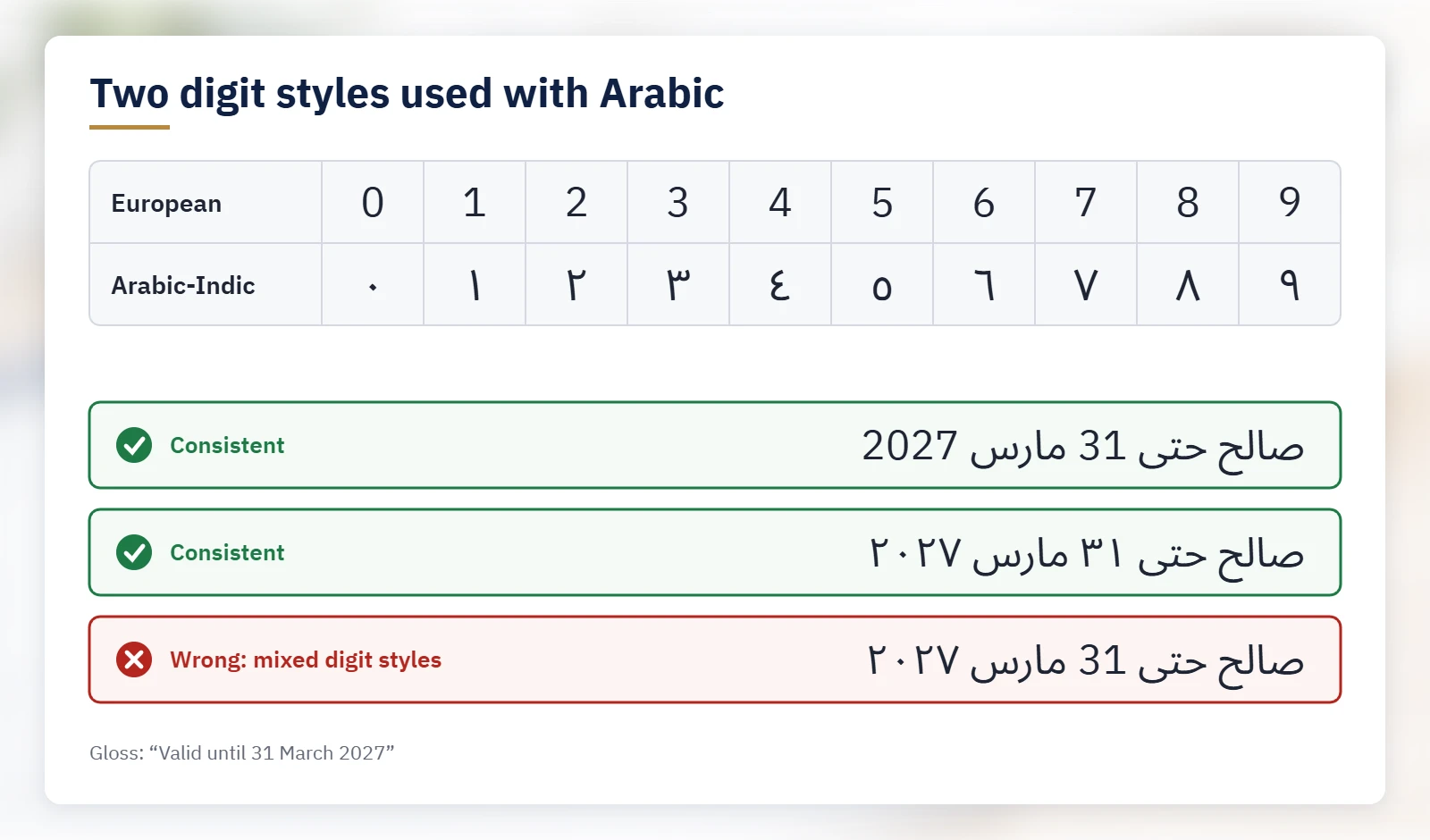
Arabic text can use the familiar digits 0–9 or the Arabic-Indic digits ٠ ١ ٢ ٣ ٤ ٥ ٦ ٧ ٨ ٩. Arabic-Indic digits are associated with countries such as Egypt and Saudi Arabia and European digits with countries such as Algeria and Morocco (W3C), but neither style is exclusive to a region (Richard Ishida). Mixing them within the same text or element is the defect. صالح حتى 31 مارس 2027 and صالح حتى ٣١ مارس ٢٠٢٧ (“valid until 31 March 2027”) are both consistent. صالح حتى 31 مارس ٢٠٢٧ (incorrect) is not.
Compare every figure with the source: percentages, quantities, dates, phone numbers and units. “A 24-month warranty” must still say 24 and months, and a dollar amount must still say dollars (دولار), not riyals (ريال). If the source date is Gregorian and the Arabic shows a Hijri date, marked هـ, ask why.
4. Check that nothing is missing or left over
You can catch structural omissions without reading Arabic. Put source and target side by side and count paragraphs, headings, bullets and table rows. Compare length by characters, not words: Arabic attaches small words such as “and”, “the” and “for” to their neighbors, so it usually has fewer words than the English. A paragraph far shorter than its neighbors, relative to its English, deserves a question, as does a three-item list that became two. An extra paragraph or item may be something the tool invented.
Then scan for stray English (brand names, codes and URLs may be intended) and, if the output came from a chat window, wrapper text such as إليك الترجمة: (“Here is the translation:”) or a closing ملاحظة: (“Note:”) paragraph.
5. Check names, brand terms and repeated terms
Pick one form per brand term. “Pro plan” can become خطة Pro, خطة برو or الخطة الاحترافية. Mixing them is the problem.
If your glossary says “dashboard” is لوحة التحكم, search for it and for rivals such as لوحة المعلومات or الداشبورد. Search for the core term rather than a full sentence, because Arabic attaches words such as “and” to the front (ولوحة التحكم is “and the dashboard”). Leave off a leading “the” too, because “for the” absorbs it: الحساب (“the account”) becomes للحساب (“for the account”). Arabic spelling also varies in ways that many searches treat as different words: the hamza on alif (أ, إ, ا), a final ى or ي, a final ة or ه, and optional vowel marks (مرحبًا or مرحبا). Unless your search tool normalizes Arabic, it won’t match one form to another, so search for each variant.
6. Check placeholders, tags and code
In مرحبًا {first_name}، تم شحن طلبك رقم {order_id}. (“Hello {first_name}, your order no. {order_id} has shipped.”), both placeholders are intact. A placeholder that was translated, such as {الاسم_الأول} (incorrect), will break the template, as will a deleted one. Count placeholders, tags and format codes such as %s or {0} per string against the source, then test the string in the product with real values, because a Latin name or a number inserted at runtime can reorder an Arabic line.
7. Check two decisions: form of address and register
The first decision to check is the form of address. English “you” has no gender, while Arabic usually has to choose one, and researchers have built dedicated datasets for first- and second-person gender in English-to-Arabic machine translation. For a mixed audience, set a rule (masculine as a convention, plural, or rewording). Otherwise the AI chose, possibly differently on each screen.
The second is register: business content is normally in Modern Standard Arabic (MSA). Marketing may use dialect on purpose (see transcreation in MSA vs dialect), but an accidental mix is a defect. Search for a few common dialect words: Egyptian عايز or عاوز (“want”) and ازاي or إزاي (“how”), Levantine هيك (“like this”), and شلون (“how”), which is Iraqi, Kuwaiti and eastern Gulf, and also common in Syria. Run each search twice. With whole-word matching on, you avoid false hits: a plain search for مش (“not” in Egyptian, Levantine and some other dialects) also finds مشروع (“project”). With it off, you catch forms with و or ف attached, such as ومش or وعايز. A hit is a reason to ask, not proof.
8. What these checks can’t tell you about accuracy
Many of the costliest errors are invisible to a non-reader: a wrong word sense, a subtly different meaning, the wrong tone. Our guide to common errors in AI-translated Arabic shows real examples. So are agreement errors, the dual (two files is ملفان or ملفين; a UI string such as 2 ملفات (incorrect) breaks standard Arabic grammar, which uses the dual for two; our app plurals guide covers the software side) and idioms. Clean results mean only that the file is free of the problems you can see. For anything customer-facing, legal, medical or brand-critical, a native-speaker linguist should compare the Arabic with the source.
9. If the Arabic came from an AI plugin on your website or app
Website and app translation plugins add their own risks: they can translate short strings without context and miss text they don’t see, such as meta titles, alt text, system emails and script-loaded content. Run the checks above on live pages, on mobile as well as desktop, and check the layout: in a mirrored Arabic interface, back and next arrows point the other way and progress bars fill from the right, while logos, play buttons and clocks stay as they are. Then work through our Arabic website localization checklist and the app localization guide to plurals, RTL and bidi.
10. Proofread, revise or re-translate?
Proofreading, revision and re-translation are separate services:
- Proofreading is monolingual. A linguist corrects the Arabic alone, so missing clauses and wrong meanings can slip through.
- Revision is bilingual. A linguist checks the Arabic against the English, segment by segment, and corrects accuracy as well as language. When the first draft came from AI rather than a human translator, this bilingual correction is usually called post-editing (see AI-assisted translation with post-editing). It addresses meaning errors and omissions, which proofreading alone can miss.
- Re-translation fits systemic problems: the wrong register or address throughout, a misread source, repeated omissions. For legal, medical or patent text, ask first whether AI should have been used at all; re-translation by a specialist linguist is often the safer route.
Checklist: check AI-translated Arabic before it goes live
- View the Arabic where it will appear: page, app, PDF, image or video.
- Confirm the letters connect into words, with no empty boxes, symbols, clipped dots or mismatched fonts.
- Confirm that a line ending in a full stop or exclamation mark has it at the far left, and that phone numbers match the source.
- Look for the Arabic comma ،, semicolon ؛ and question mark ؟, not the Latin ones.
- In apps and websites, check that arrows and progress bars are mirrored and that logos and play buttons are not.
- Check that one digit style is used throughout.
- Match every number, date, currency and unit to the source.
- Count paragraphs, headings, bullets and table rows against the source.
- Scan for untranslated English and chatbot wrapper text.
- Search for brand names and key terms, their spelling variants and their likely rivals.
- Count placeholders, tags and format codes, and test them in the product with real values.
- Ask which form of address and which register were used, and search for dialect words.
- Send high-stakes content for bilingual review by a native-speaker linguist.
Working with Locstars
Before you decide, you can send a sample for a free AI translation check on our AI translation review page: up to 300 words of Arabic text, and you get a short summary of the main issue types, with examples, the same business day. It’s one check per company, a company email is required, and we can sign your NDA before the check. It doesn’t include a corrected file or a score. For the whole file, ask for a full review and correction. If you don’t have a style guide or glossary, we can create them. We also work inside your Phrase, XTM, Smartling, Crowdin or Lokalise project, and we can translate a sample from your own document before a larger commitment. To scope a project, request a quote.
This article is general information. It is not a review of any specific content, and its checks do not replace review by a native-speaker linguist.
About the author: The Locstars AI & Technology team combines AI-assisted workflows with native-speaker specialist linguists who review and post-edit Arabic for companies.

