
Arabic App Localization: Plurals, RTL and Bidi for iOS, Android, Web
Arabic is the language that tests whether an app was internationalized properly. Hard-coded strings, concatenated sentences, English-only plural logic and left/right layout values all break the moment Arabic text arrives. Many of these problems are cheap to fix in code before translation starts and expensive to fix after release.
This guide is for product, engineering and localization leads preparing an iOS, Android or web product for Arabic.
1. Arabic app localization starts with externalized strings
Every user-facing string belongs in a resource file (Localizable.xcstrings on Apple platforms, res/values/strings.xml on Android, JSON or ICU message files on the web), never in code. The harder rule is to never build sentences from fragments.
Take a message assembled in code as “You have ” + count + ” new messages”. In Arabic, the noun changes with the number: لديك 5 رسائل جديدة for five, but لديك 11 رسالة جديدة for eleven. Give translators one complete message with a named placeholder, plus a comment describing where it appears and what the placeholder holds. On Android, wrap text that must not be translated, such as a product name, in an xliff:g tag so translators leave it untouched.
2. Arabic plurals: six CLDR categories, not two
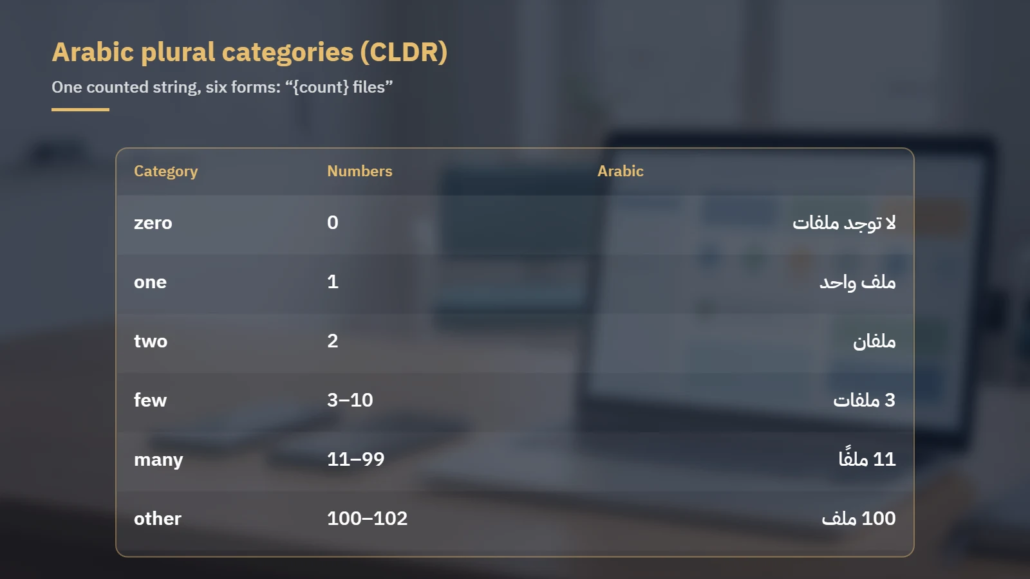
English needs two plural forms, one and other. Arabic uses all six categories defined in the Unicode CLDR plural rules, and several depend on the last two digits of the number rather than on its size.
| Category | Numbers (CLDR rule) | Arabic for “file” |
|---|---|---|
| zero | 0 | لا توجد ملفات |
| one | 1 | ملف واحد |
| two | 2 | ملفان |
| few | 3–10, 103–110 … (n % 100 = 3–10) | # ملفات |
| many | 11–99, 111–199 … (n % 100 = 11–99) | # ملفًا |
| other | 100–102, 200–202, 1000, decimals | # ملف |
On the web and in any ICU-based stack, the English source might be {count, plural, one {# file} other {# files}}, while the Arabic translation fills all six branches: {count, plural, zero {لا توجد ملفات} one {ملف واحد} two {ملفان} few {# ملفات} many {# ملفًا} other {# ملف}}. The ICU user guide recommends writing full sentences inside each branch rather than splitting a sentence around the plural.
On Android, the plurals resource accepts the quantities zero, one, two, few, many and other; the Android documentation names Arabic as the example of a language that needs the zero form. In Xcode, choosing Vary by Plural in a String Catalog makes Xcode add the plural variants each language needs as you add it. In JavaScript, new Intl.PluralRules(“ar”).select(n) returns the correct category for any number.
3. Gender in second-person UI text
Arabic marks gender in “you” and in the adjectives and verbs that follow it. “Are you sure?” is هل أنت متأكد؟ when addressing a man and هل أنتِ متأكدة؟ when addressing a woman. If your product knows the user’s preferred form of address, an ICU select argument can carry both versions; the ICU guide advises putting select arguments on the outside and nesting a plural inside. If it does not, agree on a neutral phrasing strategy in the style guide before translation begins.
4. Mirroring the layout on each platform
An Arabic interface is mirrored: navigation starts on the right, back arrows point right and progress runs from right to left. Each platform provides direction-neutral tools that work only if code avoids hard-coded left and right.
| Task | iOS (UIKit) | Android | Web |
|---|---|---|---|
| Turn on RTL | Leading/trailing constraints mirror automatically in RTL languages | android:supportsRtl=”true” in the manifest (Android 4.2, API 17+) | dir=”rtl” and lang=”ar” on the html element |
| Direction-neutral spacing | Leading and trailing, not left and right; natural text alignment | android:paddingStart, android:layout_marginStart, android:gravity=”start” | margin-inline-start, padding-inline-end, inset-inline-start |
| Directional icons | imageFlippedForRightToLeftLayoutDirection() | android:autoMirrored=”true” (API 19+) | Mirrored asset or transform scoped to dir=”rtl” |
| Views that must not flip | semanticContentAttribute: .playback, .forceLeftToRight | android:layoutDirection=”ltr” on the view | dir=”ltr” on the element |
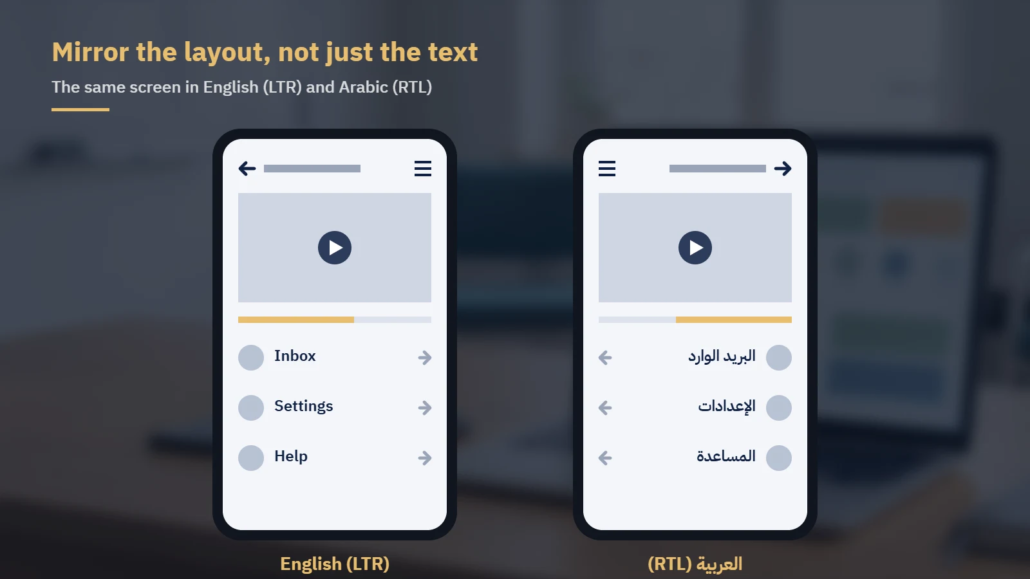
Apple’s Human Interface Guidelines give practical rules for the exceptions. Flip icons that show forward or backward motion, and flip sliders and progress indicators. Do not flip logos, checkmarks, clocks or photographs, and do not reverse the digits within a number such as a phone or card number. Apple’s UIKit documentation cites media playback controls as an example of content that should not flip, and provides the .playback attribute for them. On the web, set dir on the root element rather than relying on the CSS direction property.
5. Bidirectional text: isolate every variable
Arabic screens routinely mix scripts: product names, email addresses and URLs stay in Latin script inside Arabic sentences. The Unicode Bidirectional Algorithm (UAX #9) decides the display order, and it can produce misplaced punctuation or numbers attached to the wrong phrase when an inserted value carries no directional context.
The fix is isolation. Android’s documentation shows the case of an address beginning with “15” inserted into a translated “Did you mean %s?” string, and solves it with BidiFormatter.unicodeWrap(). On the web, the bdi element isolates inserted text such as user names, and dir=”auto” lets the browser detect a value’s direction. Apple’s String(localized:) wraps interpolated values in markup that keeps their direction separate from the surrounding message. At the character level, these mechanisms rely on the isolate controls LRI (U+2066), RLI (U+2067), FSI (U+2068) and PDI (U+2069), which UAX #9 encourages over the older embedding controls.
6. Numbers, dates and digits
Arabic-speaking markets do not share one set of digits. Apple’s WWDC22 session on right-to-left support notes that some countries, such as Saudi Arabia, use Arabic-Indic digits while others, such as the United Arab Emirates, use Latin digits, and that individual users can choose their preferred digits. Run on current CLDR data, Intl.NumberFormat formats 1234.5 as ١٬٢٣٤٫٥ for ar-EG and as 1,234.5 for ar-AE.
Never hard-code digits, separators, percent signs or currency symbols in a string. Pass numbers, dates and currency through the platform formatters with the user’s locale, and let translators position the placeholder.
7. Test before the translation arrives
Pseudo-localization finds layout and bidi bugs while they are still cheap. Xcode’s scheme options include a Right-to-Left Pseudolanguage, which runs the app in its development language with the interface mirrored. Android offers the ar-XB pseudolocale, which forces right-to-left direction and reverses characters, and the en-XA pseudolocale, which expands text to expose truncation. Both are enabled in a debug build type with pseudoLocalesEnabled true (Groovy) or isPseudoLocalesEnabled = true (Kotlin DSL), and require Android 4.3 (API 18) or higher.
Once real Arabic text is in place, run in-product linguistic testing on devices to catch truncated labels, clipped diacritics and plural forms that read wrongly in context. Games follow a similar test pass; see our Arabic game localization checklist.
8. App Store and Google Play listings
Store metadata is localized per language and has hard limits. In App Store Connect, the app name runs to 30 characters, the subtitle to 30, promotional text to 170, the description to 4,000, and keywords to 100 bytes. The keyword limit is counted in bytes, not characters, so an Arabic keyword list holds fewer letters than an English one; confirm the count in App Store Connect. Google Play allows 30 characters for the app name, 80 for the short description and 4,000 for the full description.
Treat the listing as marketing copy with search intent, not a string file: research the Arabic terms buyers actually search, and shoot screenshots from the mirrored Arabic build.
Pre-release checklist: Arabic strings, plurals and bidi
- All user-facing strings externalized, with translator comments and no concatenation
- Every counted string routed through plural APIs with all six Arabic categories filled
- Gender or neutral-address strategy agreed and applied across the product
- Layouts use leading/trailing, start/end or CSS logical properties, with no hard-coded left/right
- Directional icons mirrored; logos, checkmarks, clocks, media controls and photos left unflipped
- Inserted values isolated with BidiFormatter, bdi, dir=”auto” or String(localized:)
- Numbers, dates and currencies formatted by locale, with no hard-coded digits
- RTL pseudolanguage or ar-XB pass completed before translation
- In-product linguistic testing on devices after translation
- Store name, subtitle, keywords and descriptions within limits, with Arabic screenshots
Working with Locstars
Locstars translates app and software strings into Arabic from English, Chinese, French, Spanish, German, Turkish, Russian, Hindi, Japanese and Korean, using native-speaker translators who are subject specialists. We deliver files in the format you send, keep a consistent term glossary, and keep the same team on your account from release to release. You own the translation memory, and repeated strings from later releases are charged at reduced rates for TM matches. We can run in-product testing on your Arabic build, research Arabic keywords for your store listing copy as part of marketing localization, and add editing and proofreading by a second linguist as a separate, optional step. Before a large project, we can translate a sample from your own string file, and we work under your NDA. See our software localization services or request a quote and receive it within one business day.
About the author: The Locstars Software Localization team is made up of native-speaker Arabic translators who are subject specialists, translating app strings, software interfaces and store listings into Arabic, with in-product testing of the Arabic build.

