
Arabic Website Localization Checklist: RTL, hreflang and Arabic SEO
An Arabic website that is translated but not localized is easy to spot: menus that still open from the left, arrows pointing the wrong way, phone numbers scrambled by bidirectional text, and a search presence built on keywords nobody in Riyadh or Cairo actually types. Many of these problems start long before a linguist sees a single string.
This checklist is for the teams who own an Arabic launch: web, product and marketing managers, and developers on WordPress (WPML or Polylang), Shopify or a headless CMS.
1. Decide the locale strategy before anything is translated
The first question is which Arabic you are publishing, and for whom. A single Arabic version written in Modern Standard Arabic can serve users across the Gulf, Egypt and the wider region. Separate versions for Saudi Arabia, the UAE or Egypt make sense when prices, currencies, shipping, legal pages or product ranges differ by country, or when your marketing copy needs a more local voice.
Then choose a URL structure. Google Search Central describes country-code domains, subdomains and subdirectories as workable options and does not recommend URL parameters such as ?lang=ar for locale targeting. For many companies, subdirectories on the existing domain (/ar/, or /ar-sa/ and /ar-eg/) are the easiest to maintain.
- Keep one language per page. Google advises against side-by-side translations and against translating only the navigation and footer while the main content stays in English.
- Do not auto-redirect visitors by IP address or browser language. Google warns this can stop users and Googlebot from reaching every version; offer a visible language switcher instead.
- Confirm your CMS stores slugs, metadata, alt text and structured data per language, not just body text.
2. Build a real RTL layout, not a text-aligned copy
Right-aligned text is not RTL. The W3C recommends declaring direction in the markup itself, with dir=”rtl” on the html element (alongside lang=”ar”), rather than applying direction through CSS. Once the base direction is set, the whole layout should follow: navigation starts on the right, the logo usually moves to the right, sidebars swap sides, and breadcrumbs read right to left.
The cleanest route is CSS logical properties (margin-inline-start, padding-inline-end, text-align: start) instead of hard-coded left and right values. One stylesheet then works in both directions.
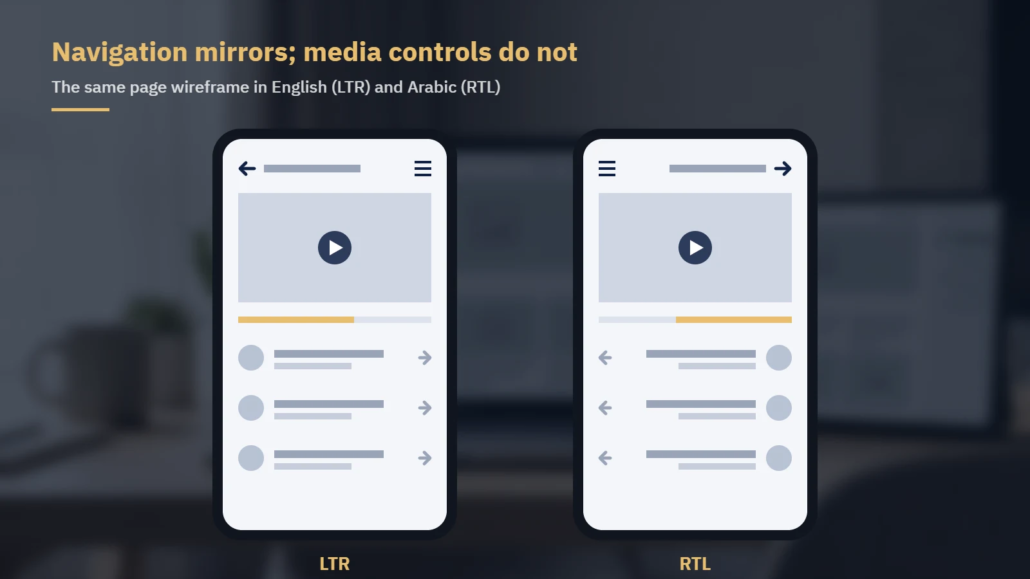
Over-mirroring is common too. Material Design’s bidirectionality guidelines are a useful reference:
| Element | Mirror in RTL? | Why |
|---|---|---|
| Back/forward arrows, “next” chevrons, carousels | Yes | They show direction of navigation |
| Progress steps and sliders | Yes | They follow reading direction |
| Media play buttons and video progress bars | No | They refer to media playback, not reading direction |
| Clocks, circular refresh icons | No | Clockwise is clockwise in every market |
| Logos, product names, untranslated text | No | Brand assets stay as designed |
| Phone numbers and other numbers | No | Digits read left to right inside Arabic text |
Two more checks catch many visual defects. First, mixed-direction text: an English brand name, a model number or a URL inside an Arabic sentence can push punctuation to the wrong end of the line. Test these strings in context and isolate them with bdi or dir markup where needed. Second, typography: Arabic is a cursive script, so choose a web font with a full Arabic character set, give it enough line height for its ascenders and descenders, and reset letter-spacing to 0 for Arabic text. The CSS Text specification says that if a browser cannot space out a cursive script without breaking its letter connections, it must not apply the spacing, so tracking inherited from Latin headings can break letter joins or be handled differently across browsers.
3. Get hreflang and canonicals right
hreflang tells Google which language or regional version of a page to show to which searcher. Google’s requirements work as a checklist:
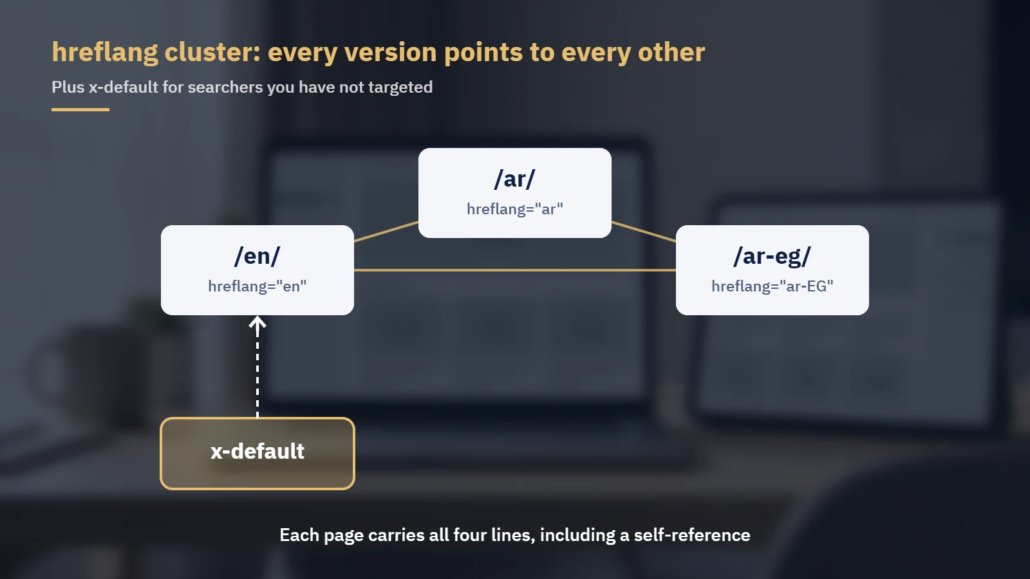
- Every version lists itself and all other versions. If two pages do not point to each other, Google ignores the annotations.
- Use ISO 639-1 language codes, optionally followed by an ISO 3166-1 Alpha 2 region code: ar, ar-SA, ar-AE, ar-EG. A region code on its own is not valid.
- Use fully qualified URLs, including https.
- Add an x-default entry for searchers whose language you have not targeted, usually pointing to your language selector or main English page.
- Pick one method (HTML link tags, HTTP headers or the XML sitemap) and keep it consistent.
- Give each language and regional version a self-referencing canonical. Google asks that, when you use hreflang, the canonical points to a page in the same language, never back to the English original, and pointing /ar-eg/ to /ar-sa/ could drop the Egyptian page from the cluster.
A typical cluster for one page looks like this: en → https://example.com/en/pricing/, ar → https://example.com/ar/pricing/, ar-EG → https://example.com/ar-eg/pricing/, x-default → https://example.com/en/pricing/. Each of the three pages carries all four lines. If you publish country versions only (for example ar-SA and ar-EG), also give one of them a generic ar entry. Otherwise Arabic speakers in the UAE, Kuwait or Qatar match no Arabic version and are sent to the x-default page.
Note that Google does not use hreflang or the lang attribute to detect a page’s language; it reads the visible content, so Arabic pages need fully Arabic text, titles and headings.
4. Research Arabic keywords instead of translating English ones
Translating an English keyword list gives you correct Arabic that people may not search for. Arabic search behavior varies by country and register. A few examples of what research may show:
- Regional vocabulary: research may show, for example, “مكيف” used more in the Gulf and “تكييف” in Egypt for an air conditioner.
- Spelling variants: users often type “ا” for “أ” or “إ“, “ه” for a final “ة“, and “ى” for a final “ي” (فى for في), so both forms can appear in search data.
- Transliterated brand and product names, typed in both Arabic and Latin script.
- English terms that users keep in English, especially in technology and software categories.
Keyword research should feed the Arabic page titles, meta descriptions, H1s, URL slugs and internal link text, not only the body copy. Decide early between Arabic and English slugs and avoid mixing them within one section.
5. Localize forms, dates, numbers and currencies
Checkout and lead forms are where localization gaps cost conversions.
| Area | What to check |
|---|---|
| Input fields | Use dir=”auto” on free-text fields so Arabic and English input both display correctly; keep email and phone fields left to right |
| Digits | Decide between Western digits (0–9) and Arabic-Indic digits (٠–٩) for display, and normalize Arabic-Indic (٠–٩) and Persian (۰–۹) digits in validation so typed input is accepted |
| Phone numbers | Pre-select the correct country code (+966, +971, +20) and accept local formats |
| Names and addresses | Allow for longer full names and for addresses without a postal code where that is common |
| Dates | Show day-month-year order and translated month names; confirm with your team whether any audience expects Hijri dates alongside Gregorian |
| Currency | Show prices in the local currency with a clear code (SAR, AED, EGP) and consistent placement |
| Error messages | Translate validation and system messages, which are often stored outside the CMS page content |
Also check strings outside page content: theme and plugin files, email templates, cookie banners, PDFs and images with embedded text. In WPML or Polylang, many sit in string translation rather than the page editor and are often left in English.
6. Test on the staging site before launch
Review the Arabic version in context on desktop and mobile. An exported file cannot show a truncated button, a price broken across lines or a menu item that wraps; an in-context pass on staging can.
- Every template type: home, category, product or service page, blog post, forms, checkout, 404
- Language switcher links to the equivalent page, not to the Arabic home page
- hreflang and canonical tags present and reciprocal on each template
- Arabic page titles and meta descriptions within display limits
- Transactional emails and notifications in Arabic
- Arabic URLs listed in the XML sitemap and not blocked by a noindex tag or robots.txt rule carried over from staging
Working with Locstars
Locstars localizes websites from English, Chinese, French, Spanish, German, Turkish, Russian, Hindi, Japanese and Korean into Arabic, with native-speaker translators who specialize in your subject area. For web and marketing projects, our team carries out Arabic SEO keyword research, builds a consistent term glossary for your brand, and keeps the same team on your account. Our DTP team recreates layouts and graphics in RTL, and we test the localized content in the product itself. You own the translation memory, matches from it are charged at reduced rates, and files are returned in the format you send. Editing and proofreading by a second linguist is available as a separate, optional step. We work under your NDA, can translate a sample from your own content before a large project, and send a quote within one business day. Learn more about our website localization services or request a quote.
About the author: The Locstars website localization team combines native-speaker, subject-specialist Arabic translators, SEO keyword research for Arabic markets, a DTP team that rebuilds layouts in RTL, and in-product testing of localized content.

