
Arabic Game Localization: RTL, Dialects and an LQA Checklist
By the Locstars Gaming Localization Team · Updated 30 September 2026
Arabic-speaking players have become a priority market for many publishers, and they spot a clumsy localization fast: a broken letter on the title screen, a progress bar that fills from the wrong side, a menu that addresses every player as male. A translated string table is not enough. Arabic changes the direction of your interface, how text is rendered, how the game addresses the player and how your characters sound. This guide covers the decisions that make an Arabic release feel native, and ends with a checklist to run before launch.
1. Right-to-left is a layout change, not a text change
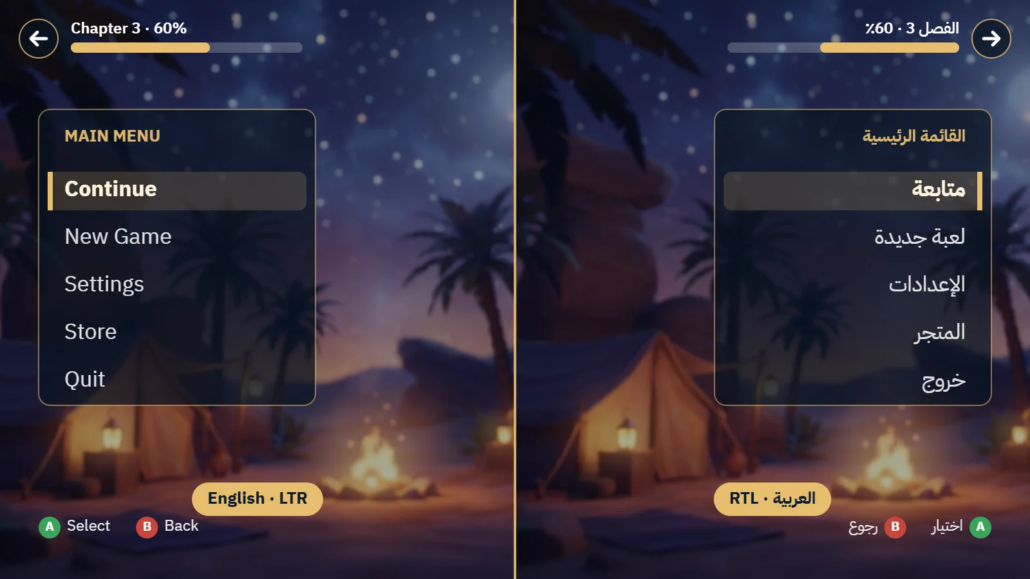
Arabic reads right to left, so the interface should mirror: menus, navigation, tab order, progress bars, sliders, inventory grids, and back and forward arrows move to the opposite side. Some things should not mirror: the game world and camera, minimaps and world maps, clocks, media playback icons, graphs over time, numbers, logos and controller button prompts. HUD elements such as health or ammo bars are a design decision to make per title. Write these rules down early, because retrofitting RTL late in production is expensive.
Mixed-direction text needs its own attention. A line that combines Arabic with a player name, a number or an English brand name can reorder itself on screen, and punctuation can land on the wrong side. These issues rarely show up in a spreadsheet; they appear in the build.
2. Your engine, not just your font, has to support Arabic
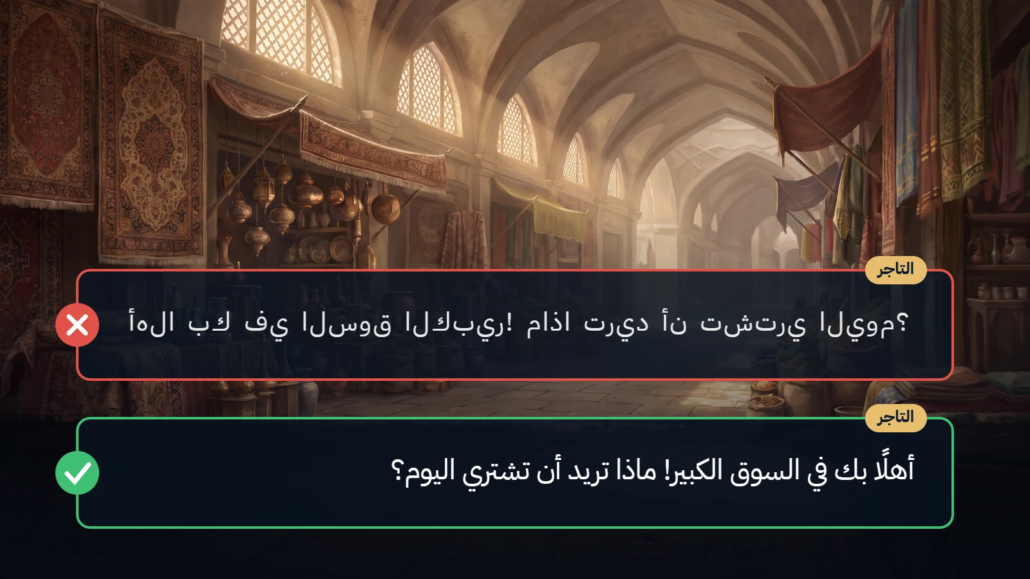
Arabic letters connect and change shape depending on their position in a word. That shaping, together with bidirectional ordering, is done by the engine’s text renderer. If the renderer does not support it, players see disconnected letters in reverse order. Engines differ: in Unity, TextMeshPro needs an RTL plugin for Arabic, while Unity 6 UI Toolkit offers an opt-in Advanced Text Generator with its own limitations. In Unreal, text widgets handle bidirectional text, but not every layout panel mirrors automatically. Confirm your text pipeline with a test build before translation starts.
Font choice matters too. Pick an Arabic font whose license allows embedding in a game, check that it covers every character and weight you need, and set a fallback for Latin text and numbers. Arabic has no capital letters and no true italics, so emphasis needs another device, such as weight or color.
3. Plan for space, height and legibility
Arabic does not expand by a fixed ratio: some strings come out shorter than English and many short UI labels come out longer. Rendered width also varies by font, and Arabic needs more vertical room for tall letters, descenders and optional diacritics. Tight line heights clip text. Arabic also reads smaller than Latin text at the same point size, so UI text usually needs a larger minimum size. Give buttons, tooltips and dialogue boxes horizontal slack and check line height, or truncation and clipping will follow.
4. Grammar your code has to respect
Arabic verbs and many adjectives change with the gender of the person addressed. “Press” said to a male player is اضغط; said to a female player it is اضغطي. “You are ready” becomes أنتَ مستعد or أنتِ مستعدة. Decide in your style guide whether the game uses a masculine default, gender-neutral wording, or gender variables tied to the player’s avatar.
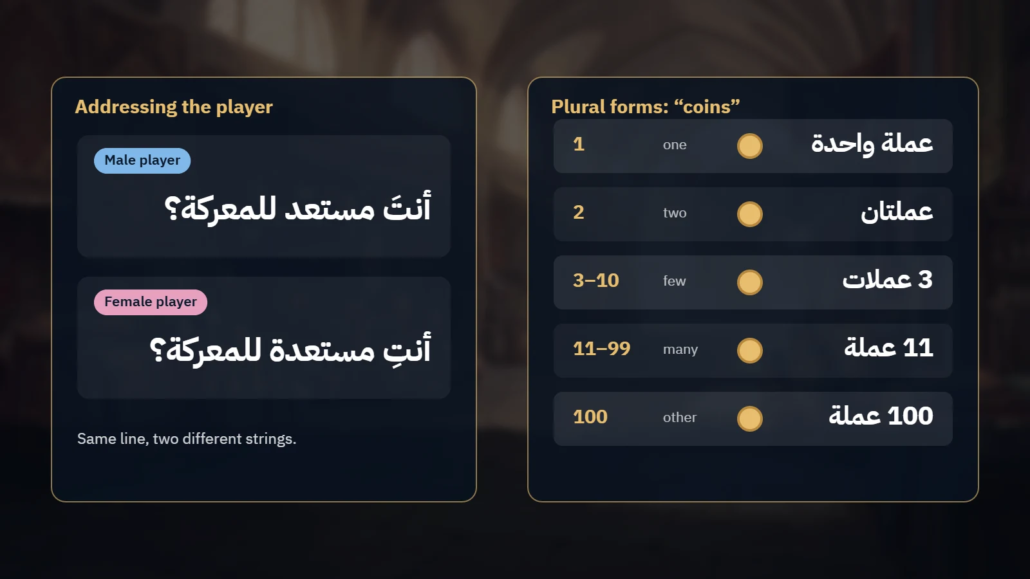
Arabic uses all six CLDR plural categories. A string such as “{count} coins” needs a different form depending on the number:
| Count | Arabic | Plural category |
|---|---|---|
| 0 | لا توجد عملات | zero |
| 1 | عملة واحدة | one |
| 2 | عملتان | two |
| 3 to 10 | 3 عملات | few |
| 11 to 99 | 11 عملة | many |
| 100 | 100 عملة | other |
Use a plural-aware format such as ICU MessageFormat rather than “number + noun” logic, and avoid building sentences by joining string fragments: word order, the definite article and agreement all change around variables.
5. MSA or dialect? Choose per content type
Modern Standard Arabic (MSA) is understood across the region and suits UI, tutorials, system messages and formal narration. Dialects such as Egyptian, Gulf or Levantine bring characters to life and suit casual dialogue, voice-over and marketing. Each also signals a market: Gulf dialect reads as Saudi- or UAE-first, while Egyptian is widely understood across the region. Written dialect has no standard spelling, so consistency depends on a clear style guide. Many studios combine the two: MSA for the interface, a dialect for selected characters or campaigns. Decide the mix, and how to treat English gaming terms your players already use, before translation starts.
6. Numbers, dates and punctuation
Decide whether the game shows Western digits (0123) or Eastern Arabic digits (٠١٢٣). Many titles aimed at Gulf and Egyptian players use Western digits in stats and UI for readability. Set rules for dates, currencies, decimal separators and Arabic punctuation (، ؛ ؟), and apply them consistently across the game and store pages.
7. Voice-over and subtitles
If your game has voiced dialogue, decide early whether you need Arabic voice-over, subtitles or both. Set the sync level per content type: lip-sync for cinematics, time-constrained lines for gameplay barks, and wild lines where timing is free. Arabic voice-over should match the register and dialect chosen above, with casting that fits each character. Lines that run longer than the original need adaptation, not just translation. Subtitles need correct RTL line breaks and a reading speed players can follow.
8. Content, culture and age ratings
Review content against your target markets before submission: religious references and symbols, alcohol, gambling-like mechanics, suggestive content, and maps, borders and place names. Check each market’s age-rating process early. In Saudi Arabia, for example, games need an age rating from the national media regulator before release. Content issues found late can hold up both the rating and the store release.
9. Text you cannot see in the string table
Look for text baked into textures, UI art and video, and for strings hard-coded in scripts. Test RTL text input in chat, name entry and search fields as well. These rarely appear in the localization kit and often surface only during testing.
Pre-launch Arabic LQA checklist
- UI mirrors correctly, and elements that should not mirror stay as they are
- Arabic renders connected and in the correct order in every font, size and platform
- No truncated, overlapping or clipped text, including diacritics and descenders
- Mixed Arabic-English lines, player names and numbers read in the correct order
- Gendered forms and plurals are correct wherever a variable is involved
- Digits, dates, currencies and punctuation follow the style guide
- Register and dialect match the style guide in text and voice-over
- Terminology is consistent across menus, quests, tutorials and store pages
- No untranslated text in textures, videos or hard-coded strings
- RTL text input works in chat, name entry and search
- Content has been reviewed against the target markets and their age-rating requirements
- Store listing, patch notes, legal texts and support content are localized too
Working with a localization partner
Locstars localizes games into Arabic with native Arabic linguists, RTL layout review and in-build testing. Our in-house multimedia team handles Arabic voice-over in a range of Arabic dialects, including lip-sync. See our game localization services, or send us your string files and a build and we will quote within one business day.
About the author: The Locstars Gaming Localization Team localizes games, apps and store listings into Arabic for publishers and developers. The team combines native Arabic linguists, in-build testers and an in-house multimedia team for Arabic voice-over and dubbing.
