
Arabic Subtitles, Voice-Over or Dubbing? A Buyer’s Decision Guide

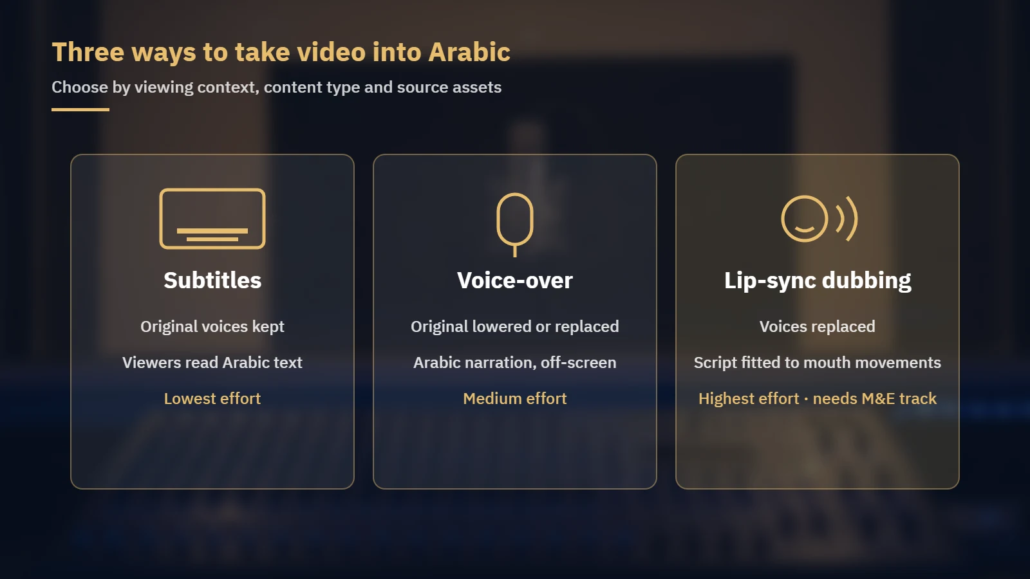
Arabic subtitles vs dubbing is rarely a simple either/or. When a company takes video into Arabic markets, the first decision is not the translation itself but the delivery method: Arabic subtitles, Arabic voice-over, or Arabic lip-sync dubbing. Each one changes the script, the schedule, the files you need to supply and the viewer’s experience.
This guide walks through the three options the way a localization project manager would: by viewing context, by content type, by Arabic variety, and by the source assets each method depends on.
1. Start with where and how the video will be watched
Before comparing costs, answer three questions about the audience:
- Will viewers watch with sound on? Social feeds and workplace screens are often watched muted, which favors subtitles. Onboarding courses, product demos and apps are usually watched with audio.
- Is the viewer’s attention already busy? If the video shows software steps, machinery or a diagram, reading subtitles competes with watching the screen. Arabic audio frees the eyes.
- Does the speaker’s face carry the message? For drama, animation, characters and brand spokespeople, the audience notices when mouths and words do not match. That is where lip-sync dubbing earns its extra effort.
Methods can also be combined, for example Arabic voice-over for a course plus Arabic subtitles for social media cutdowns.
| Factor | Arabic subtitles | Arabic voice-over (off-screen) | Lip-sync dubbing |
|---|---|---|---|
| Original voices | Kept in full | Kept, lowered under the Arabic voice | Replaced |
| Best fit | Interviews, webinars, social clips, films for mixed audiences | E-learning, corporate, documentary, product explainers | Animation, drama, game cinematics, character-led ads |
| Script work | Condensed to fit reading speed and line length | Translated and timed to each segment | Adapted to mouth movements and on-screen timing |
| Source assets needed | Video + transcript or template file | Video + script; separate voice track helps | Video + script + M&E (music and effects) track |
| Relative effort | Lowest | Medium | Highest |
2. Arabic subtitling: condense, time and render correctly
Subtitling is not a sentence-by-sentence transcript translation. Viewers need time to read, so the Arabic text is condensed to its meaning and split into readable units. Before work starts, agree the technical parameters in writing. As a reference point, Netflix’s published Arabic Timed Text Style Guide is a frequently cited public reference; its settings are one platform’s rules, not a universal standard, and your platform or broadcaster may specify different ones.
| Parameter | Netflix Arabic guide (common reference) |
|---|---|
| Characters per line | 42 |
| Lines per subtitle | Maximum two |
| Reading speed, adult programs | Up to 20 characters per second |
| Reading speed, children’s programs | Up to 17 characters per second |
| Duration per subtitle | Minimum 5/6 of a second, maximum 7 seconds (general requirements) |
| Language variety | Modern Standard Arabic only, no dialect words |
| Italics | Not used in Arabic |
These numbers interact. A full two-line subtitle of 84 characters needs at least 4.2 seconds on screen at 20 characters per second. If the speaker covers that sentence in two seconds, the translator has to cut, not squeeze.
Arabic subtitles also raise right-to-left issues that English files never do:
- Arabic punctuation. Use the Arabic comma and question mark: “Yes, I’m ready. Are you ready?” becomes “نعم، أنا مستعد. هل أنت مستعد؟“. The Netflix guide also asks for no space before commas, question marks or exclamation marks.
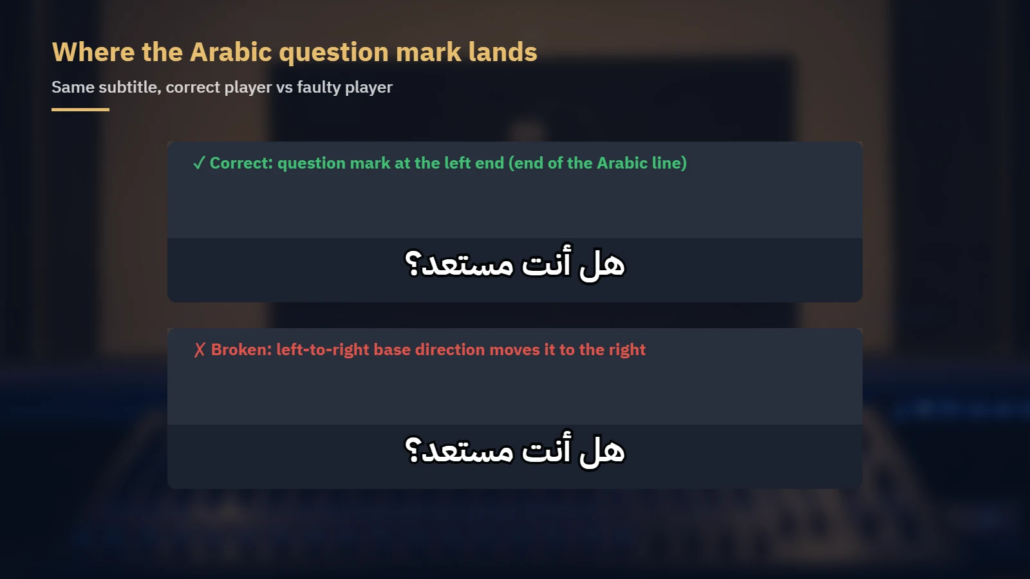
- Punctuation on the wrong side. Some players render an Arabic line with a left-to-right base direction, so the final question mark or full stop jumps to the right-hand start of the line. This is a known player behavior, often handled by adding invisible Unicode direction marks such as the right-to-left mark (U+200F). Test on the target player before approving.
- Numerals. Decide on Western digits (1, 2, 3) or Arabic-Indic digits (١، ٢، ٣) and keep one style throughout. The Netflix Arabic guide writes numbers one to ten as words (except times and dates) and uses Western digits from 11 up.
- Letter shaping. Arabic letters join, and their form changes with position in the word. Tools without Arabic shaping support can produce disconnected or reversed letters, especially when subtitles are burned in.
SRT, VTT or burned in? Sidecar files (SRT, or WebVTT for web players) keep subtitles switchable and let you update text without re-rendering the video. WebVTT adds cue positioning and styling that plain SRT lacks, which helps when subtitles must move away from on-screen text. Burned-in (open) subtitles suit social platforms and kiosks where you cannot control the player, but every text correction means a new export, so approve the text in a sidecar file first and burn in last.
3. Arabic voice-over: off-screen narration and UN-style
Voice-over is a practical choice for much corporate, training and documentary content. There are two common forms:
- Narration replacement. An off-screen narrator’s voice is replaced entirely by an Arabic narrator. This works when the original narrator never appears on camera.
- UN-style (voice-over translation). The on-camera speaker’s original voice stays audible at a lower level, the Arabic voice starts shortly after the original and ends before it. Viewers hear that a real person is speaking while following the content in Arabic. It suits interviews, testimonials filmed by the client and executive messages.
The script needs timing work even without lip-sync. Arabic sentences often need rephrasing to fit the segment between pauses, and on-screen text, product names and UI labels must match what the narrator says. If your video shows a software interface, decide early whether the interface will be localized into Arabic or stay in English, because the narration has to refer to what viewers actually see.
4. Lip-sync dubbing: adaptation, not just translation
In lip-sync dubbing, Arabic voice actors replace every on-screen voice, and the script is adapted so the Arabic line matches the length of the original, its pauses and visible mouth movements. Adapters watch for closed-lip sounds on close-ups, laughter, breaths and overlapping dialogue. A literal translation that is accurate but too long forces the actor to rush, and the audience hears it.
Two practical points decide whether a dubbing project runs smoothly:
- The M&E track. Dubbing replaces dialogue while keeping music and sound effects. Without a separate music-and-effects track, the dialogue cannot be removed cleanly from the mix. Ask your post-production team for M&E stems before requesting a quote.
- Casting per character. Each character needs a consistent Arabic voice across episodes, trailers and cutdowns. Agree character voices at the start and keep them for future content.
5. MSA or dialect: choose the Arabic for the audience
Arabic voice-over and dubbing can be recorded in Modern Standard Arabic (MSA) or in a spoken dialect. MSA is understood across the Arab world and is the usual choice for corporate, e-learning, documentary and news-style content, and, as the Netflix guide shows, for subtitles. Dialects sound more natural in entertainment, comedy, advertising and character-driven content, but they point the video at a region.
The same short line shows the difference:
| Variety | “What do you want?” | Typical use |
|---|---|---|
| MSA | ماذا تريد؟ | Region-neutral corporate, training, documentary |
| Egyptian | عايز إيه؟ | Entertainment and advertising aimed at Egyptian audiences |
| Levantine | شو بدك؟ | Content for Syria, Lebanon, Jordan and Palestine |
| Gulf (Saudi usage) | وش تبي؟ | Content for Saudi audiences; Kuwaiti, Emirati and other Gulf forms differ |
If a campaign targets one country, casting a voice actor from that dialect is usually worth it. If the same video must serve the whole region, MSA is the safer default.
6. Checklist: what to send before you request a quote
- Final (locked) video files, or a note that edits are still coming
- Transcript or script, with timecodes if available
- Existing subtitle template file (SRT/VTT) if the English version has one
- M&E track (required for dubbing), plus separate dialogue stems if available
- Target platform and player, plus any platform subtitle specification
- Target country or countries, to decide MSA or dialect
- Glossary of product names, brand terms and terms to keep in English
- Character list and reference clips for dubbing
- Whether on-screen text and graphics also need Arabic versions
- Required delivery format: sidecar file, burned-in video, separate audio stems or a final mix
Working with Locstars
Locstars’ in-house multimedia team handles Arabic voice-over in different Arabic dialects and Arabic lip-sync dubbing. Scripts are translated by native-speaker subject specialists working from English, Chinese, French, Spanish, German, Turkish, Russian, Hindi, Japanese or Korean source material, and we keep a consistent term glossary and the same team on your account to help keep terminology and style consistent across releases. We work under your NDA, deliver files in the format you send, and can translate a sample from your own script before a large project. Editing and proofreading by a second linguist are available as a separate optional step. See our multimedia localization services, Arabic voice-over and dubbing and subtitling pages, or request a quote and receive it within one business day.
About the author: The Locstars multimedia team is an in-house team handling Arabic voice-over in different Arabic dialects and Arabic lip-sync dubbing, working with native-speaker subject-specialist translators.

